
Here are certain numbers you need to know – they are (from the graphic rules):
seti cpuLevelHigh 3000
seti cpuLevelMedium 2600
seti cpuLevelLow 2000So when you are getting your CPU – you need to have at least 3 MHz. Now,
Sims 2 was invented before dual cores, quad cores, and octo cores – so
it doesn’t really know how to deal with them. What that means is that if
you have an octo core with less than 2600 it will lag, regardless of
the fact it actually has way more than 3000 in total.1. Look for CPU where EACH core has more than 2600. (It can cope with
dual cores kind of, so 2600 is enough). You’re better off with fewer
cores, but you can control how the game works if you have more so it’s
not a deal breaker.2. RAM – always get as much as RAM as you can. RAM is what determines how much CC you can handle.
3. If you can get your Operating System and/or your game onto an SSD
drive it will go like the clappers. An SSD drive is as fast as RAM when
it comes to accessing hard drives. This is not so much from a processing
point of view, as it is an accessing your game data point of view. Also
if you can have your paging files on a separate drive to your O/S and
game – that will make it go faster as well, because it won’t be trying
to access two different parts of the drive at the same time.4. Graphics cards – avoid NVidia if you can because there has been some
lagging trouble with them and Windows 10. Radeon and Intel seem fine.
NVidia can be OK, but needs to be tweaked to get it to work. The larger
the graphics card memory, the less problem with pink flashy.When installing your game on Windows 10 – I have a forum over at Leefish
with all the details on how to get it run, based on whether you have
Ultimate Collection or the CD/DVDs. They are in these two threads:Windows 10 Graphics Problems and CD/DVD
Windows 10 Graphics Problems and Ultimate Collection
Tag: resources
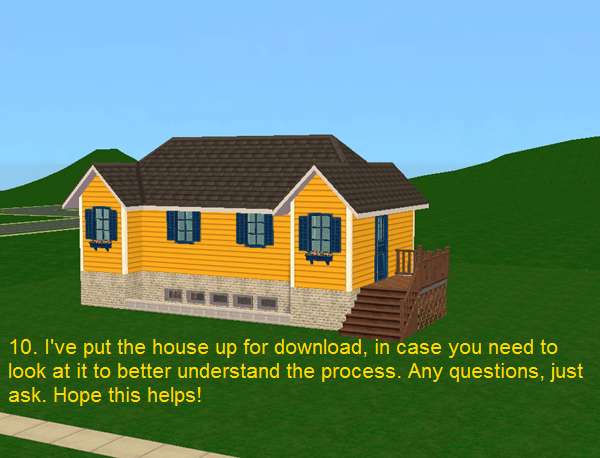
Here is an oldie but a favorite tutorial of mine-a tutorial on how to make a fully functional basement with windows by Sofy! It’s an easy to follow tutorial and it works so well. 🙂
Reblogging b/c this is the tutorial that actually taught me how to make basements and it’s great.
Also, if you don’t like the sloped ground in front of the windows afterward, this retaining wall object is really good for hiding it (though it will limit your window choices).
Get rid of Securom if you play Sims 2
I keep seeing people talk about Sims 2 bugs that they ascribe to either Windows 10 or the Ultimate Collection that are actually due to Securom. For instance, if your buy/build catalog is lagging, I can almost guarantee it’s because of Securom.
Securom’s always caused problems, but Microsoft itself has said that it’s incompatible with Windows 10. They purposefully broke compatibility with Securom and other old DRM programs because they make one’s system more vulnerable, so you need to get this thing off your computer. EA did not remove it from the Ultimate Collection on Origin (which was irresponsible of them), so you have to do it yourself.
Removing Securom is very easy to do and only takes a couple steps. Here is a clear thread on leefish about how to do it: http://leefish.nl/mybb/showthread.php?tid=6688
Before reinstalling, rolling back, anything else, try removing Securom. Even if you have no performance problems, if you still have Securom, get rid of it. It’s not a safe program to have on your computer.
Automated box-link workaround:
Well since I can’t seem to get people try it out I guess I’ll just share this fix “officially” without further testing. I stumbled upon this redirector
browser add-on (works on Chrome, Mozilla & Opera) and after bit of
twiddling I managed to get it working on box links so that you no longer have to manually edit the address to point to the mobile version of the site. To save everyone
else’s time I exported the settings I created and uploaded those here, to use them:
- Download and install that add-on
- Download and extract my preset
- Click on the button the redirector adds to your browser
- Choose the “Edit Redirects” button and it will open the settings up in new tab
- Click on the import button and then just import the file I uploaded
(extract it first if you already didn’t) and it adds 5 redirect rules for box links- ?????
- Profit. As in box links will automatically be redirected to the working mobile version of the site from now on without you having to do anything.
On
my quick testing it worked fine, also the one person who tried it and reported back said it worked for them so it should work for all. I mean there’s no reason why it wouldn’t, I was just paranoid and wanted someone to try it out first. Let me know if you find a variation of box links that don’t get redirected and I’ll update the file to include it too.
THANK YOU
 simper fi