Hi Fi! I want to download your sushi bar but I’m not sure how to use clean installer. Any advice?

Hey! First of all, do you use a Mac? The Clean Installer doesn’t work on Macs (unless you have a Windows partition, I would think?). :

If not, after you install the program, double-click on any Sims2Pack file you have downloaded (in this case, I opened the sushi restaurant), and it should bring up a window like this:

This is a list of all the CC that comes packaged with the lot. You can look through exactly what’s packaged to decide what you would like to install into your own game, and you can uncheck anything you already have (to avoid duplicates) or anything you don’t want installed. 🙂

The first item listed (Izumi Sushi) is the lot itself – you can check under the “Type” column. 🙂 If you ever download something because you want CC it has, but not the lot/Sim itself, you can uncheck this and the Clean Installer will just install the CC you leave checked. 🙂 

When you’re satisfied with the content you have checked or unchecked, just click install!

Just a note: lots don’t package any Maxis recolors, unfortunately, and they will not automatically package the master meshes for any slaved meshes you use, which is why I try to include a folder (in addition to the Sims2Pack) with the other required meshes/recolors. 

I hope this helps! Feel free to message or chat if you have other questions. 😀

Hi! What method do you use to organize your downloads folder?

Hello! I have my downloads folder (roughly) organized the way I saw @hafiseazale‘s organized when I was in Sims 2 Chat a long time ago. XD Here’s a little preview: 

I read once that the deeper your subfoldering goes (such as “CAS->Clothing->Male->Everyday->Separates->Skell”), the slower your load times. I haven’t tested it both ways, but anyway, that’s why I have so many individual folders immediately within my main downloads folder and few subfolders. ^^; 

After the buy mode stuff, my folder goes to “S-DEFAULTS” and “Z-MODS”. 🙂

@allisas uploaded a similar folder system for anyone who just wants to download the empty folders already labeled, you can grab those HERE. The only difference is that I have my buy mode stuff labeled by creator instead of category.

I hope that helps! I’ve been trying to better organize my CC within the actual folders (especially my MaxisRecolors folder – that’s a nightmare). It’s, uh, slow-going. XD

Hi, Fi! You’re always so helpful and knowledgeable when it comes to ts2, so I was hoping you could help me once more. I’ve read a bit about the compressorizer to help shrink cc, but I haven’t been able to find anything about sending cc through it twice. For example, if I run something through it that the original creator already compressorized, will it corrupt the file? I guess I’m nervous about doing it and I was hoping you had some advice/experience with it. Thanks. :)

Awww, shucks! I try to be as helpful as possible (although sometimes my knowledge fails me :3). As far as I know, sending something through the compressorizer a second time shouldn’t have any effect on it. I ran my entire downloads folder through the compressorizer about a week ago, and there were definitely files in there that the original creator had already compressed. Those files just remained the same size. 🙂 However, I have heard reports of some Simmers experiencing issues with their game after running their entire downloads folder through the compressorizer, so I’d recommend making backups of your cc before trying it! 🙂 

My downloads folder went from 13 GB to 8.6 GB, which seems impressive but I haven’t noticed any difference in load times or anything. 😛

Hi! I really love your BaCC and I’d love to set something similar up in my game. So I was wondering (this may be a silly question) is it possible to create a “clean” hood free of default townies etc (and make my own ones), but still keep them in other hoods I play? I play Pleasantview and Strangetown mainly so I’d want the townies and NPCs there. I only ask because I’ve struggled to find a tutorial that’s super clear about it (or maybe I’m just misreading!). Thank you in advance :)

Of course! This isn’t a silly question at all – it actually confused the hell out of me for the longest time until I forced myself to sit down and do it. 🙂 The important thing to remember is that if you install empty templates, it will only affect new neighborhoods you create – any existing neighborhoods will have all the premades/townies intact. 🙂 So if you already have your Pleasantview and Strangetown hoods underway, you don’t need to worry about them when you install the empty templates. Only the neighborhoods you start after that will be townie-free. 🙂 

Whenever I have to reinstall my game, I first delete the premade hoods, install @meetmetotheriver‘s clean templates, put together my uberhood, then I install the empty templates to form my completely custom neighborhood. 🙂 This is the tutorial I use for creating an empty hood (even though it says it’s outdated – it works for me!). * Keep in mind that if you have the Ultimate Collection the folder locations will be a bit different. *

As always, before making changes to your game, MAKE A BACKUP! It’s good to get into the habit of making regular backups. I try to make one at least once a week (depending on how often I’ve been playing or messing around with my neighborhoods). 

I hope this helps! If you have any other questions, feel free to ask. 🙂

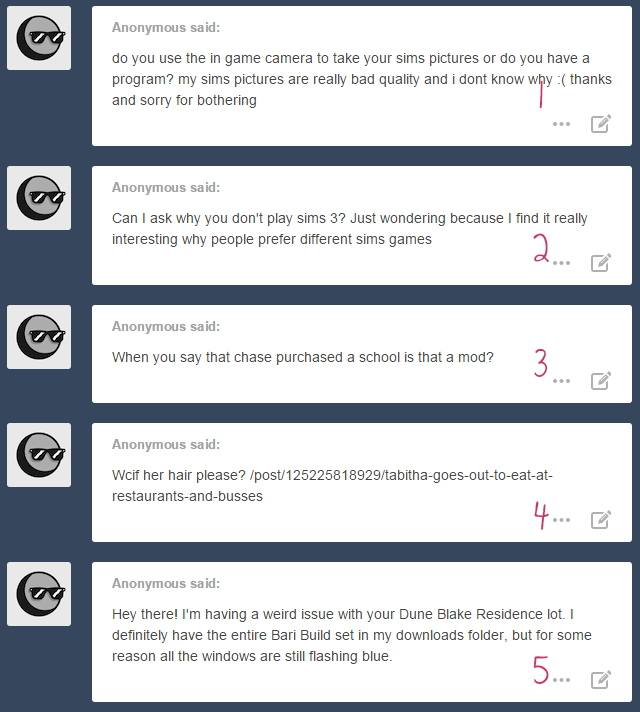
1. Hi hi! I use Fraps to take my screencaps, but I also run them through Photoshop to brighten/sharpen/etc. 🙂 (I really should make an FAQ page soon! I realize that my answers to past asks aren’t readily available to read through. ^^;)

2. Sure! I actually answered a similar ask already HERE. I mentioned my feelings on TS3 and TS4, and why I prefer to stick with TS2. 🙂 

3. Hi there! It’s not a single mod, per se, but a couple of different modded objects that allow you to run a school from a residential or community lot. Check here for more links!

4. I answered this already HERE! 🙂 

5. Meeeeeep! I’m so very sorry. 😦 The windows that are missing are Tig’s Metro Windows, which (I’ve only just noticed now) use the repository technique. I didn’t realize this and just assumed they were included in the package. My apologies! I’m still really bad at this lot-uploading thing. D: Do the doors and arches show up? Those are definitely part of the Bari set, so they should appear just fine. But try adding Tig’s Windows to your download folder and replacing the lot. Let me know if this works! ^^;

wait what school? what mods? me is curiousss

Heheh! Inge at Simlogical made a series of hacked objects/mods to enable you to run a school from a residential lot. @silivrin​ wrote a nifty tutorial showing how to utilize the mods and run a school from a community lot/Sim-owned business (which is what I’m doing). So, after some inspiration from @deedee-sims‘s BaCC, I decided to build a school of my own to test them out. 😀 

Do you maybe know where to get decent eye-bags for sims? For some reason I have trouble finding any I like. Also, is there something that covers up freckles (my sim has a freckly skin and I do want to have the freckles on the body, but sometimes not on her face)?

Hey anon! The only eye-bags I have in my game are by Rensim, Simple Life, and Onah. I’m not sure if you’ve given any of those a try. As for the freckles, I went through all of the makeup I have in my game and I don’t really have anything that covers up freckles. : Lilith’s Golden Wings blush somewhat minimizes them, but that’s about the only thing that I have (in my game, at least). I’m sorry I couldn’t be of more help!

I don’t know if anyone asked you this before…but how long does it take your game to open? I’ve got a ton of cc and it takes upwards of 15 minutes for me. :(

Hi there! I have been asked this before, but since I’ve been culling cc like mad lately, I don’t mind answering again. 🙂 It takes about 15-20 minutes for me to get to the main neighborhood screen and an additional 5-10 minutes to load CAS. That’s with 13 GB of cc installed – about a year ago, I was hovering between 17-18 GB. D: 

I’d say that fifteen minutes is a very decent loading time for TS2, especially if you have a ton of cc! There are some Simmers out there with games that take over an hour to load. When I used to play on a laptop, my game took at least 30-40 minutes to load. So while it’d be nice to have a game that loads in five minutes, I’d say fifteen (or even a bit more) is a fair trade-off for having a ton of cc installed! 🙂